Campaign threads & locations
Keeping the open loops visible, and knowing where everyone is.
Campaign pulse
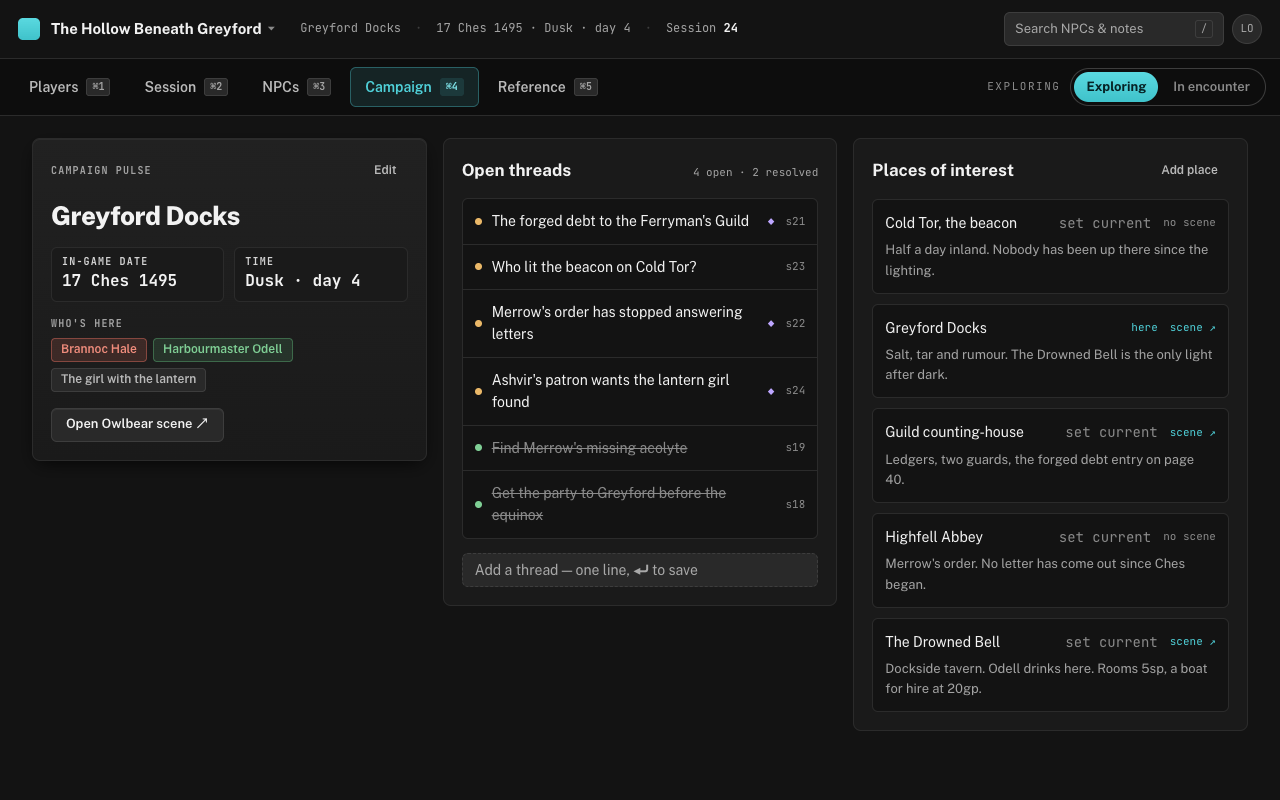
The Campaign tab (⌘4) opens on the pulse: where the party is, the in-game date, the time of day, and who’s there. This is the state you’d otherwise re-derive from last week’s notes in the first five minutes of the session — “wait, was it dusk or the next morning?” — and, apart from the who’s-here list, it’s the same set of facts the header shows on every tab.
Press Edit on the pulse card to change any of it. Pick a place from Current location, or leave it on “— free text below —” and type where they are if the party is somewhere you haven’t written up. The drawer also holds the campaign’s name and, below a rule, Delete campaign — type the name to confirm, and everything in it goes. Who’s here lists every NPC you’ve placed at the current location; click a chip to open them. Open Owlbear scene ↗ sits at the bottom of the card; it’s live when the current place has a scene URL and greyed out until then.
Threads
A thread is one line: the loop the party opened and hasn’t closed. “The barge captain knows who paid for the crossing.” “Grum promised the orphanage a roof.” Type it into the field at the bottom of Open threads and press ⏎; the thread is tagged with the latest session’s number — “s21” — so you can see how long each one has been hanging. Threads you add before the first session get no tag, and a thread can’t be reworded once saved; resolve it and add a new line.
Click the dot beside a thread to resolve it. Resolved threads move below the open ones, struck through, and stay visible — the count in the corner reads “5 open · 12 resolved” — because a thread the party thinks is closed is exactly the kind you’ll want to reopen when the sequel arrives. Click the dot again and it’s open.
Locations
Under Places of interest, Add place takes a name, a line on what’s there and what’s for sale, an Owlbear Rodeo scene URL, and private DM notes. Each place row has set current, which is how you move the party — the row you’re at reads here instead — and a scene ↗ link, or no scene, depending on whether one is attached. The scene URL has to be a full https:// link; a bare room code won’t save. Click the name for the drawer with the full description and notes; its Edit changes the description, scene URL and notes — a place keeps its name — and Remove deletes it outright.
For a place the party hasn’t reached yet, write the one thing that makes it different and the one thing that’s for sale there. You’ll improvise the rest when they arrive, and you’ll do it better with those two facts than with three paragraphs you wrote a month ago.
Advancing in-game time
The date and time of day are text fields, not a clock. “17 Ches” and “Dusk · day 4” are both fine, and so is your own calendar. The app never advances them on its own — it doesn’t know whether the party spent the night or a fortnight — so moving time is a deliberate act at the end of a scene, done through the pulse card’s Edit.