Conditions & temporary effects
Official conditions, the effects your sheet app doesn't track, and why they look different.
Official conditions
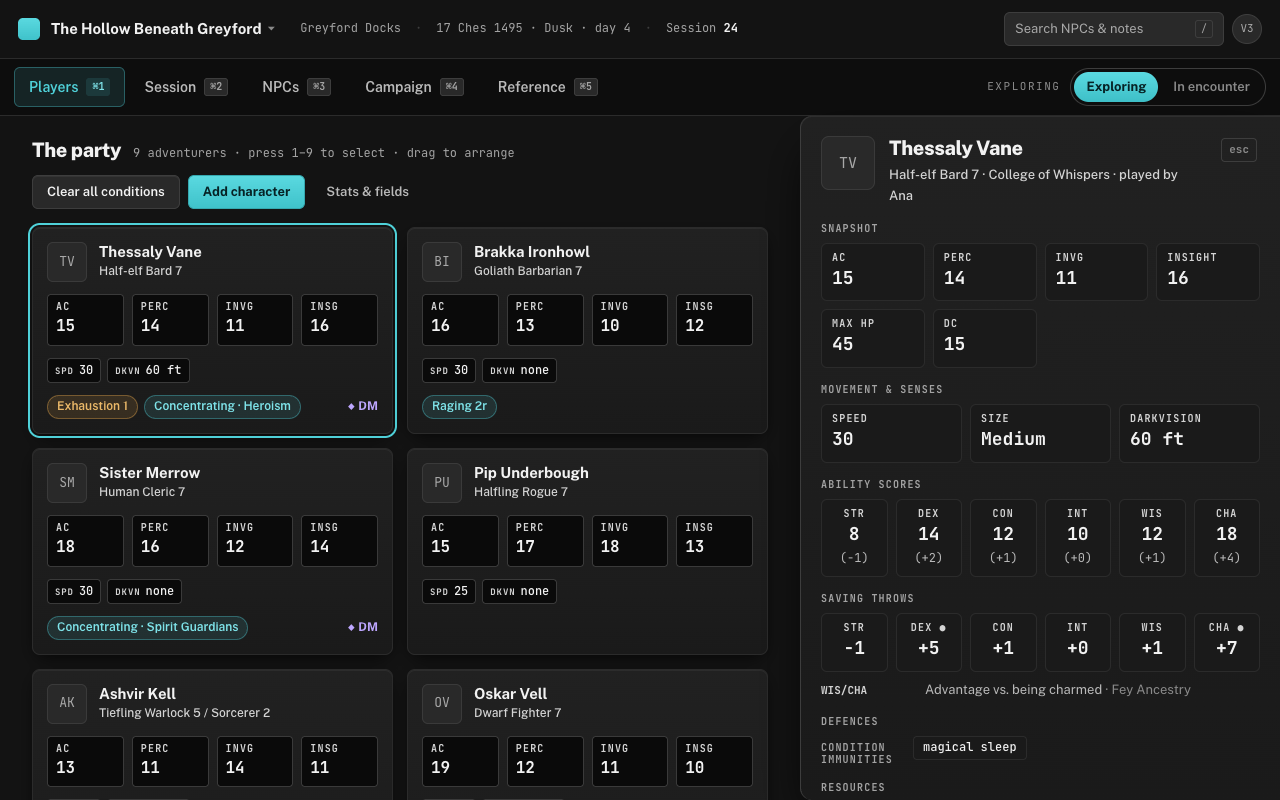
The fixed list is the fifteen from the rules — Blinded, Charmed, Deafened, Exhaustion, Frightened, Grappled, Incapacitated, Invisible, Paralysed, Petrified, Poisoned, Prone, Restrained, Stunned and Unconscious — and nothing else can be added to it. That’s deliberate: a condition is a rules object with a fixed meaning, and the chip carries that meaning with it. Hover any chip on a card and the full rules text appears (effect chips have hover text too, saying whether the effect needs concentration); the Reference tab (⌘5) lists them with a one-line summary, and a click on a row opens the full text.
To put one on a character, open their profile drawer — click the card, or press its number (1–9) and ⏎. The drawer’s Conditions section has every condition as a chip; click to toggle. With the drawer beside the party you can hop between characters by clicking their cards, so a round of “who’s still poisoned?” is a few clicks. Exhaustion is the one condition that carries a level: adding it starts at 1, and a row of buttons steps it from 1 to 6. A second dose of exhaustion updates the level rather than stacking a duplicate chip.
Temporary effects
Everything that isn’t an official condition is a temporary effect: Rage, Bladesong, Bless, a Haste that will drop the moment the wizard takes a hit. These are the gap the app exists to fill. No sheet tracks them, they change every round, and the only place they have ever lived is in your head or on a sticky note.
An effect is free text plus one checkbox: conc., for anything that needs concentration. Type the name, tick the box if it applies, press Add (or ⏎). A concentrating effect renders as “Concentrating · Bless”, and because a creature can only concentrate on one thing, adding a second concentration effect quietly replaces the first. Adding an effect with a name that’s already on the card replaces it rather than duplicating it. In the profile drawer, click the effect’s chip (it carries a ×) to end it.
Why they’re coloured differently
You should be able to tell the two kinds apart without reading. Official conditions are amber, and the five that take a creature out of the fight — Incapacitated, Paralysed, Petrified, Stunned, Unconscious — are red. Temporary effects are the accent cyan. Each wash carries a border in the same hue, so the chips read at a glance even on a shared screen.
Switch to encounter mode (E) and the order flips: effects come first, conditions after, with a dot on every concentrating effect (while exploring, the chip says “Concentrating ·” instead). That’s the question you’re actually asking during a fight — “is she still concentrating?” — put ahead of the one you’re asking less often. Encounter mode is a view setting; it goes back to Exploring when you reload.
Clearing them
Nothing clears on its own. The app has no clock of its own and no idea when your combat ended, so a condition stays until you take it off. Open the profile drawer and click a condition chip to toggle it, or an effect chip to end it; clicking the Exhaustion chip again removes it outright. Chips on the card itself only show their tooltip — clicking the card opens the drawer.
After a long rest, Clear all conditions at the top of the Players tab wipes every condition from every card. There’s no confirmation step, and the button is greyed out when no one has a condition. It leaves temporary effects alone: a rest doesn’t tell the app whether the Bladesong was still up, and ending those is one click each.