Choosing which stats show
Every campaign reads different numbers. Decide which get a full well, which sit on the compact row, and which stay hidden.
Wells, the compact row, and hidden
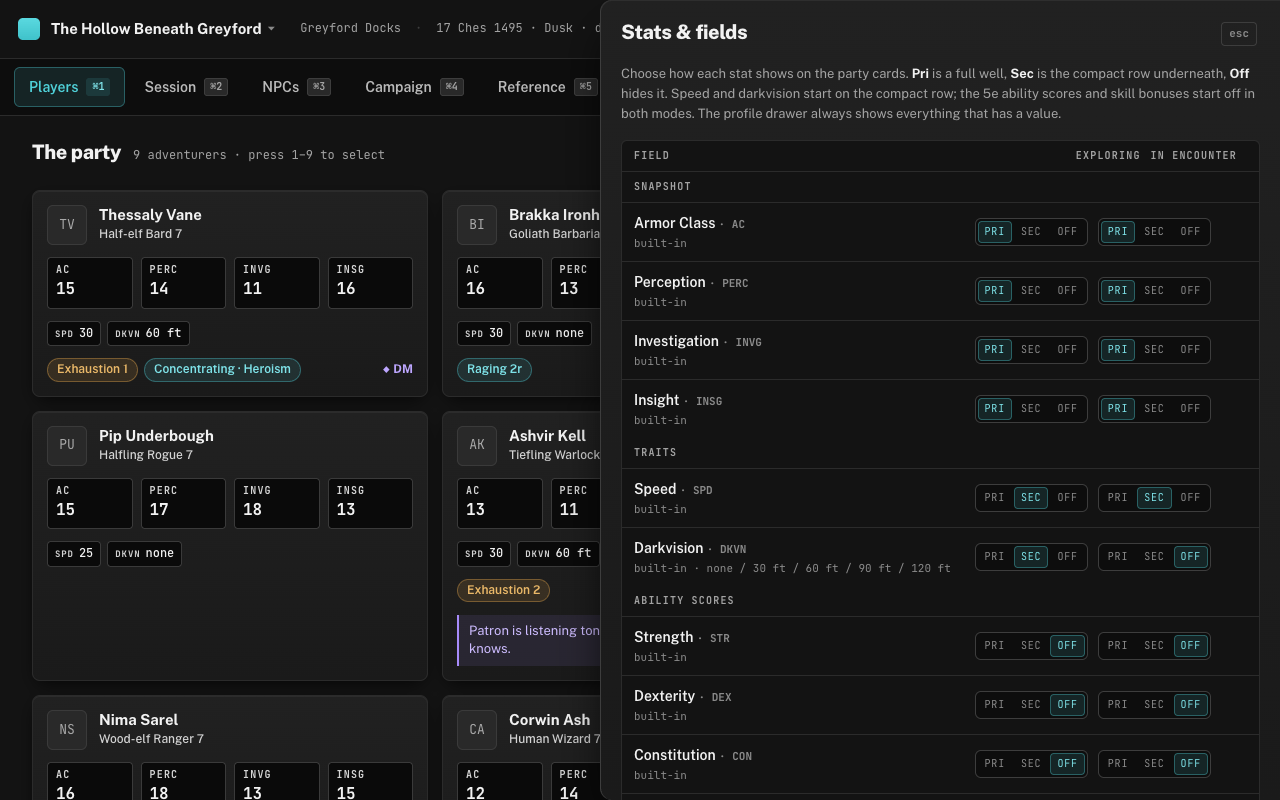
Every stat on a party card has one of three levels of prominence. Pri gives it a full well — the big mono figure you can read from across the room. Sec puts it on the compact row underneath, a small labelled value that’s there when you look for it. Off hides it from the card entirely. The profile drawer ignores all of this and shows everything with a value, so hiding a stat never loses it.
You set each level twice: once for exploring and once for encounters. A campaign that reads passive Perception constantly on the road but only cares about AC when swords come out can have exactly that, and switching modes with E swaps the emphasis without moving a single card.
What ships as a field
Four built-ins come as wells in both modes: AC, and passive Perception, Investigation and Insight. Two traits — speed and darkvision — sit on the compact row while exploring; darkvision drops off the card in encounters, because you stop asking about it once the torches are lit.
Everything else the app knows about a 5e character is also there, hidden in both modes by default: max HP and spell save DC, size and the other senses (blindsight, tremorsense, truesight), alignment, languages and a free-text “other languages” line, the six ability scores, the six saving throws and the eighteen skills. The four defence lines — resistances, immunities, vulnerabilities and condition immunities — are there too, so a party full of resistances can put them on the compact row. The drawer lists them in groups — Snapshot, Traits, Identity, Combat, Ability scores, Saving throws, Skill bonuses, Defences and your Custom fields — and the three skills that share a name with a passive are labelled “Perception (skill)” and so on. Saves and skills show the same total the drawer derives from the score, level and proficiency, so a promoted Stealth well stays right when the character levels and you update the level (unless you typed the sheet’s total, which stays as typed). Forty extra wells would bury the four you actually need, and most tables ask for a skill bonus rarely enough that the drawer is the right place for it. Turn one on when it becomes a running question — a Stealth-heavy campaign might promote Stealth to the compact row for the whole party and leave the rest hidden.
Custom fields
Stats & fields, at the top of the Players tab, is also where you add fields the game doesn’t ship with. Give it a name, a short label of up to eight characters for the well, a type — number, text, select or multiselect — an optional tooltip, and where it should show in each mode, then press Add field. Names must be unique, a select needs at least one option, and min and max are whole numbers; a campaign can hold fifty custom fields. A select takes its options in order, comma separated, which is how you model a ladder: “none, tinge, marked, consumed” for a corruption track reads exactly like exhaustion does. Numbers can carry a minimum and a maximum.
Values are entered per character through Edit in the profile drawer, in the Campaign fields section at the bottom of the form. Custom fields get the same Pri / Sec / Off treatment as everything else — a new one starts on the compact row while exploring and off in encounters unless you pick otherwise when adding it — and can be removed from the campaign later (the toast offers an Undo); the built-ins and the standard 5e fields cannot.
Keeping the card readable
The honest warning: more than four or five wells and the two-second glance stops working. The card is a fixed size, the wells share its width, and a row of seven figures is a row you have to read rather than see.
Wells are for what you are asked for constantly — the numbers a player wants before you’ve finished the sentence. The compact row is for everything you’ll look up once a session. Hidden is for everything else, and the drawer is one keypress away when you need it.