Running a session
Capture now, clean up later. The app is built around that order.
Start the session
On the Session tab, press Start session (the button carries the number it’s about to start). This stamps the clock, opens the note field, and carries over anything in Tonight’s plan from your prep. Until you start there’s no note field at all — only the plan, the past-sessions list and the session number — so there’s no half-state where notes go somewhere ambiguous.
The session number is editable right there before you start, and a campaign can begin at whatever number you’re already on, so adopting the tool at session 25 is fine: set the campaign’s first session number when you create or edit the campaign, and the Session tab offers it for the first session. Numbers have to be unique within a campaign; the tab tells you if the one you typed is already taken. Adding a plan item before the session exists creates it without starting it, which is how prep works: the plan is written days before the clock runs.
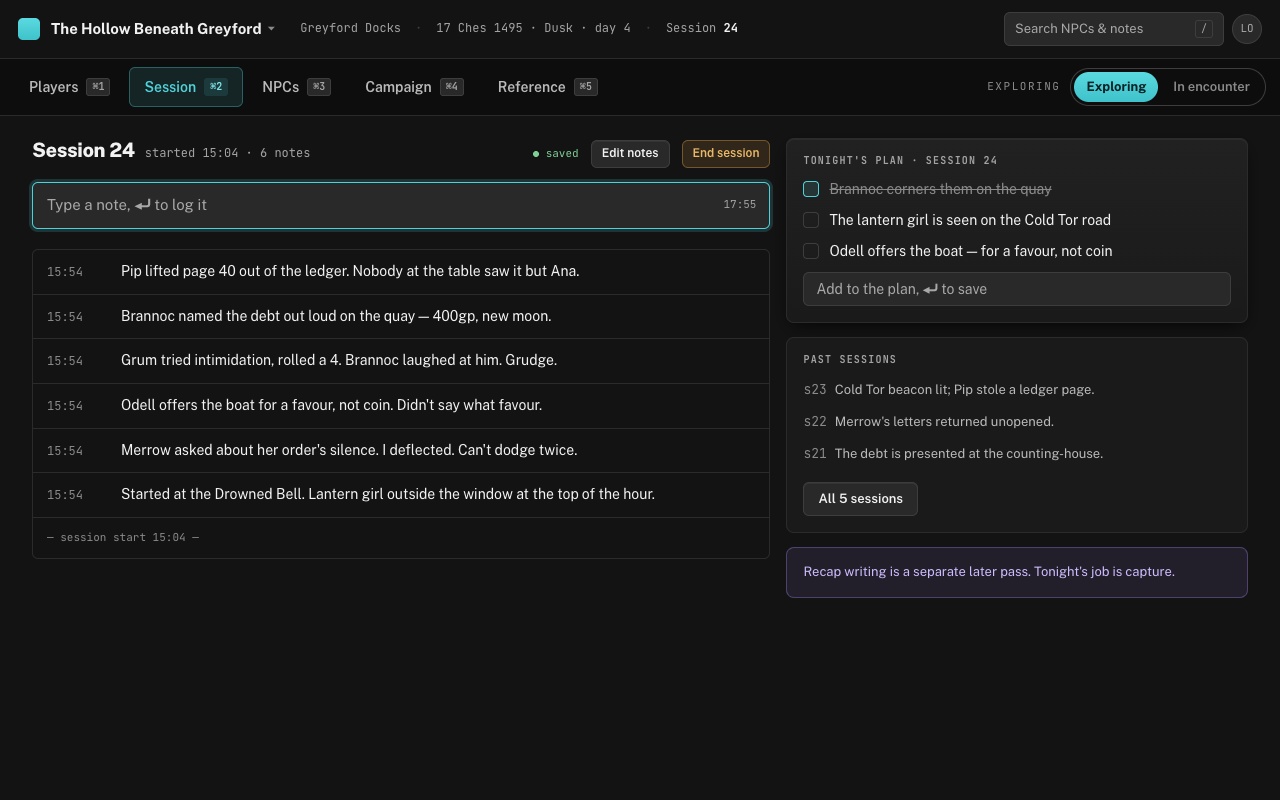
Capturing notes
Once the session is running, press N from any tab. On the Session tab it drops you into the note field; anywhere else a small overlay opens, with your last logged line shown underneath so you don’t log the same thing twice. (Before you’ve started, the overlay just tells you to start the session on the Session tab.) Type, press ⏎, and it’s logged with a timestamp. On the Session tab the field clears and keeps focus, so a second note is just more typing; in the overlay, logging closes it and puts you back where you were, and esc closes it without logging — the text isn’t thrown away, it’s waiting in the field next time.
There are no required fields, no categories and no confirmation step. That’s the point: you should be able to log a note while still talking, without looking at the screen. If you need a line break inside one note, use ⇧⏎. If you logged too early, ⌘Z on an empty field pulls the last note back into it.
Tonight’s plan
The right column holds the two or three things you planned to happen; type one and press ⏎ to save it. Tick them off as they land. Items can be ticked and unticked but not edited or removed, so keep them short. Their real job is passive: an item still unticked at hour three is the one you keep sliding past, and seeing it sit there is usually enough to fix that.
During play, hands off the log
The live log has no inline editing. ⌘Z takes back the last note; anything older waits for Edit notes, which opens the session in a drawer where every note can be reworded or deleted. Click a note to edit it: ⏎ saves, ⇧⏎ adds a line, esc cancels. Delete shows an Undo, which re-logs the text at the current time rather than restoring the original timestamp. Keeping edits out of the main view means you can’t lose a line by clicking the wrong thing mid-sentence, and the log stays a record of what was said when.
If you’re looking for something you logged earlier tonight, / filters the log by text. The filter is the header search box, so the same term also narrows the NPC roster until you clear it with esc.
After the session
Press End session when you wrap; it’s in the session header and in the session’s drawer. Cleanup is a separate later pass: open the session from Past sessions (the list shows the three most recent, and All N sessions expands it), tidy the notes, add anything you forgot with Add a note after the fact, and write the recap. The drawer also lets you fix the session’s number or date, and it warns you when you’re editing a finished session rather than tonight’s. The recap is what shows in the past-sessions list next week; until you write one, the row says how many notes are waiting.
If you never do the cleanup pass, nothing breaks. Raw timestamped notes stay in the session, which is enough to answer “what did we promise the harbourmaster?” three months later.