NPCs & improv names
A roster you can search mid-sentence, and names for the people you didn't plan.
Adding an NPC
On the NPCs tab, press Add NPC. The form is short on purpose: a name, one line about who they are, a status, the session they were last seen in, where they are, their relationship to the party, and a private DM notes field. Status starts as Unknown and the place starts as the party’s current location, so a walk-on takes two fields. Open a card for the drawer: Edit changes any field, and Remove deletes the NPC straight away — there is no undo, so mark them Dead instead if the party might ask.
The one-liner is the field that matters. It’s what you’ll actually read during play, so make it say what they want, not what they look like — “Ferryman’s Guild collector, wants 400gp by the new moon” gets you back into character in a breath; “tall, scar, grey cloak” does not. Save the description for the notes.
Status and relationships
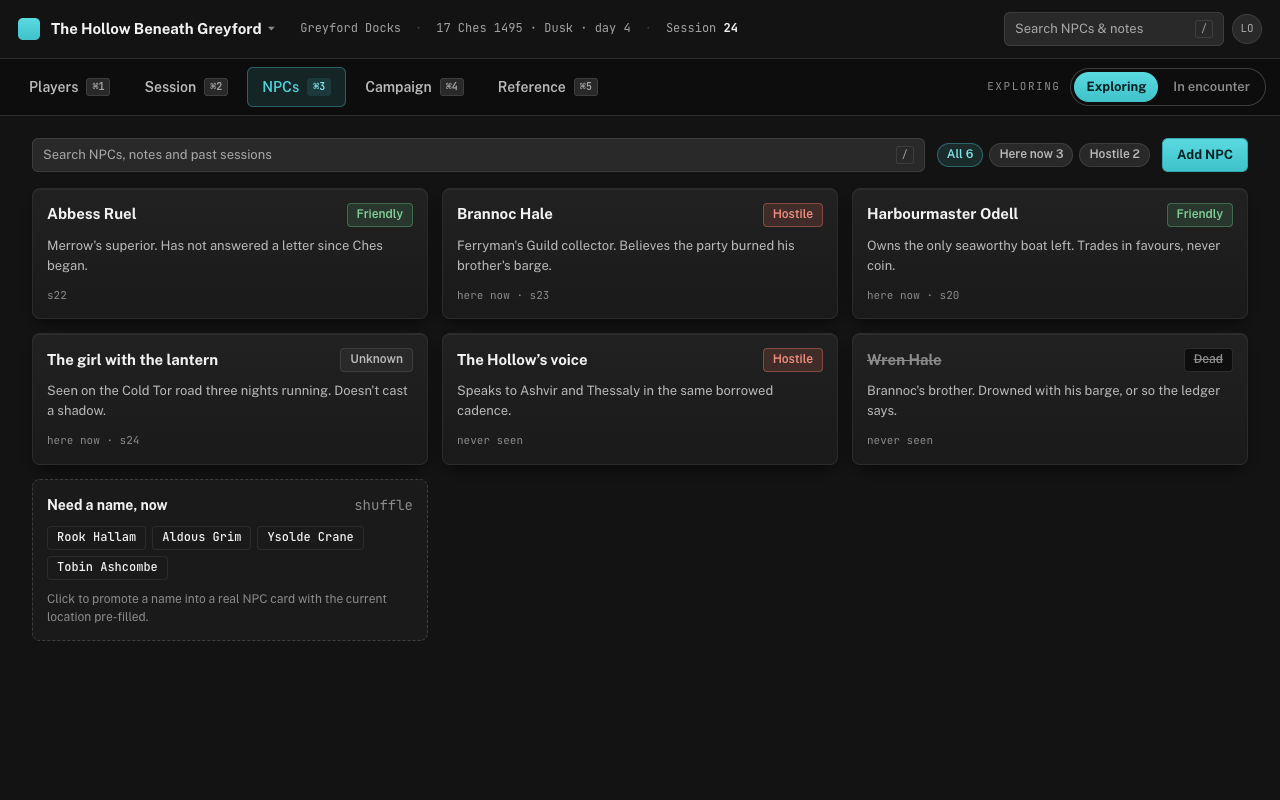
Status is one of four: Friendly, Hostile, Unknown and Dead. It colours the chip on the card so the roster reads at a glance — hostile in red, friendly in green, unknown neutral — and a dead NPC is struck through rather than deleted, because the party will ask about them again. The small line under the one-liner says where they are — “here now” when it’s the party’s location — and the session they were last seen in. Three chips sit beside the search, each with a count: All, Here now — everyone whose place matches the party’s current location — and Hostile, which shows exactly who you’d expect.
Linking an NPC to a place pays off later. When you set that place as the campaign’s current location, the NPC appears in the Campaign tab’s Who’s here list and picks up the “here now” filter without you touching the card. The relationship line — “owes the party a favour”, “thinks Grum killed her brother” — is the thing you forget between sessions. It lives in the drawer, but the search reads it too, so typing “favour” finds her from the roster.
The improv name generator
At the end of the roster is a small panel: Need a name, now, with four names drawn from a pool that fits a fantasy setting without sounding like a random-syllable generator. Press shuffle for four more. Click one and the New NPC drawer opens with that name filled in and the party’s current location already chosen, so the fishmonger they decided to interrogate becomes a real NPC in the time it takes to write “sells fish, saw the barge”.
This is for the people you didn’t plan. The moment the party asks a stranger their name, you have one, and if the stranger turns out to matter, they’re already on the roster, placed where the party is. Type the session number into Last seen and the card carries it too.
Finding someone again
Press / from anywhere you’re not already typing, and start typing. The roster is alphabetical; on the NPCs tab it filters by name, one-liner, relationship and your private notes, so “harbour” finds the harbourmaster, the deckhand who works for him, and the note about the bribe. If nothing matches, the empty state offers Create NPC “…” with what you typed as the name — the usual reason nothing matches is that the party just met them.
The same search box filters tonight’s log on the Session tab, which is the other place a half-remembered name tends to live. esc clears it — after closing any drawer that’s open first.